Features · Call sheets

Call sheets that know who has confirmed.

Build the day on the sheet itself. Send one email per person with their own call time at the top. Watch Sent → Opened → Confirmed come back on the status card — no PDF hunting on a phone, no reply-all.

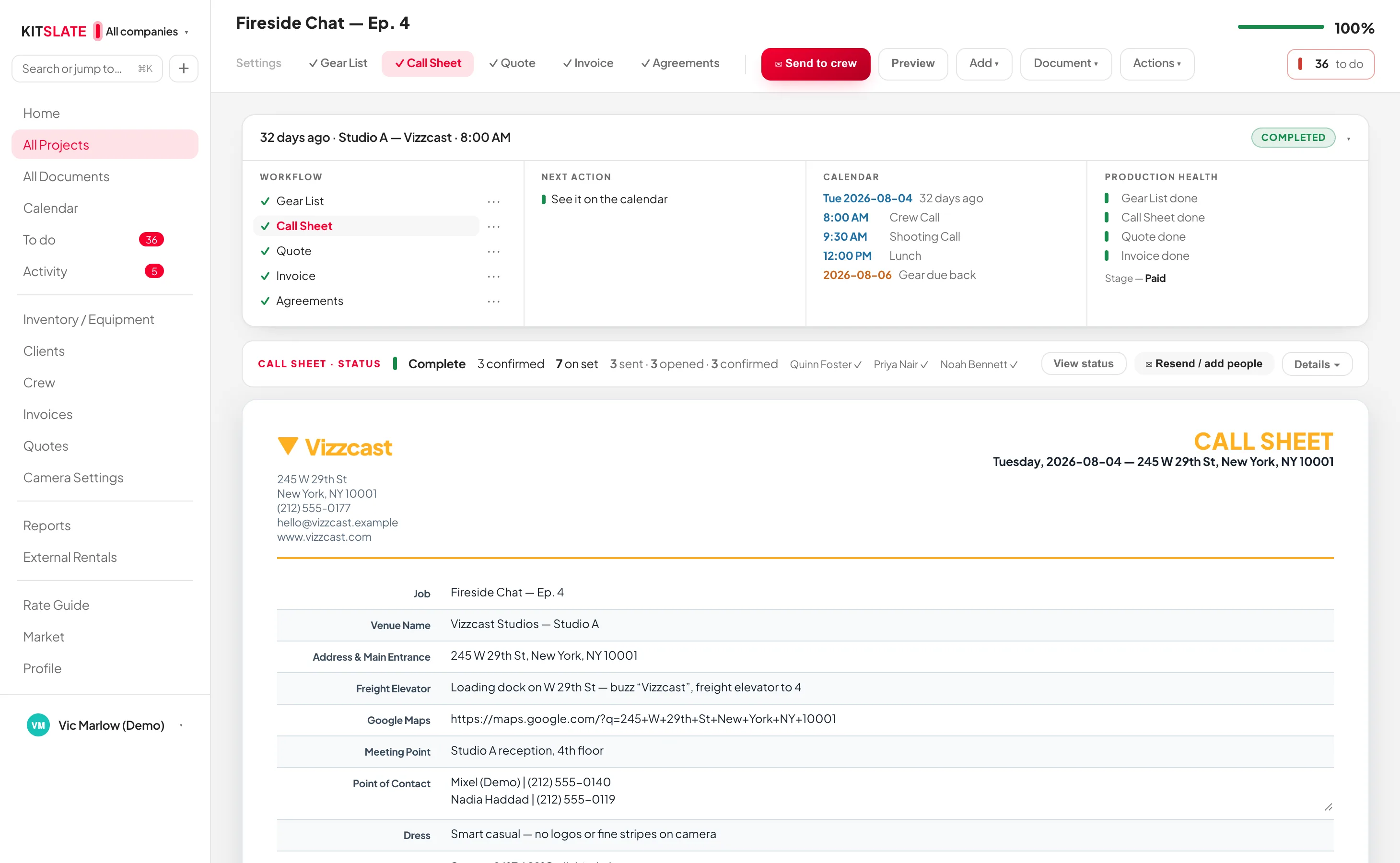
app.kitslate.app · call sheet
The KitSlate call sheet editor — venue, key times, the crew table and the schedule, all edited in place on the sheet
Everything is edited in place on the sheet. A multi-day job carries one sheet per day, as tabs.
01 · BUILD — the day, on the sheet

Everything edited in place, one sheet per day.

A job that runs three days carries three tabs. Add a key date and a tab appears; add a day and a key date appears. The printed title reads CALL SHEET — DAY 2 OF 3.

The venue remembers itselfType an address you have shot at before and the freight elevator, meeting point, maps link, hospital, urgent care and parking fill in from the last sheet there. Only blanks are filled.
Crew from your address bookAdd people from your crew database with their role, phone and email already on the row. Everyone on the quote comes across in one click.
Times the way you say themWith a 9 AM crew call, typing 5 in Est. Wrap gives 5:00 PM. A blank call time means the crew call and a blank location means the main entrance — the editor greys in what a blank will read as.
Weather from the addressPress ↻ and the forecast for that address and date lands on the sheet, about sixteen days ahead.
Talent, clients on set, department notesEach has its own block. The talent list is what feeds the agreement, so nobody is typed twice.
Sheet types and templatesShoot Day, Travel Day, Scout, Rehearsal, Load In, Strike. Save a layout as a template and load it onto the next job — it brings its layout and text, never somebody else's people.
02 · SEND — one email per person

Their own day first. Nobody is CC'd.

Send to crew opens the sending box: the roster with tick-boxes on the left, the email exactly as it will arrive on the right. Press Send and each person gets their own message.
Their call, at the topThe email opens with the person's own call time, start location, role and contact, then carries every section the sheet has. The PDF is attached, but nobody has to open it to find their time.
One-tap confirmationEach email carries its own ✓ Confirm — I'll be there link. Confirming opens their own online copy of the sheet, with their call first.
Replies go to youReplies land with the company on the letterhead, never with KitSlate.
Who is eating whatDietary flags from your crew records roll up into a catering summary on the status card, so lunch is ordered from the sheet, not from memory.
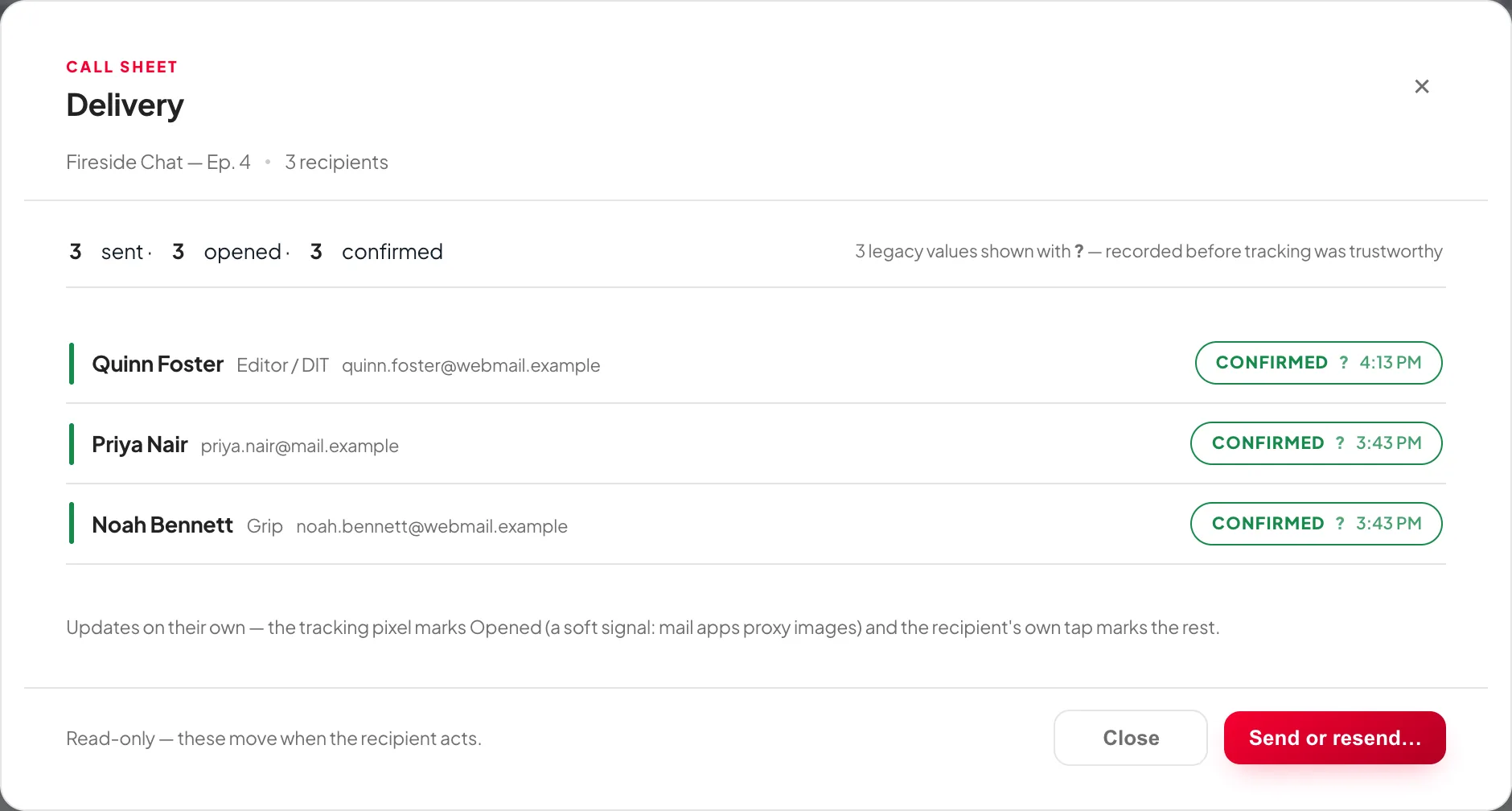
app.kitslate.app · call sheet · status
The call sheet status card open — each crew member's row showing sent, opened and confirmed with times
The status card: the tally in the collapsed row, the per-person grid under Details.
03 · TRACK — sent, opened, confirmed

Per person, with times.

The CALL SHEET · STATUS card tracks each person through Sent, Opened and Confirmed. The tally and how many are on set sit in the collapsed row; Details opens the grid.

Sent linksThe job's Settings tab carries a row per person: View as they see it, Copy link, Resend (they confirm again) and Reset, which takes them back to Sent.
A cancelled link says soAn expired or cancelled link shows the person a plain notice — who sent it, what it was, and how to ask for another — not a dead page.
Import any production's sheetAI import reads someone else's call sheet and links the names to your crew automatically. Your own CSV export imports back in as well.
On the calendarShoot days, scouts, load-ins and strikes draw on the calendar and click straight back to the sheet.
QUESTIONS — the ones people ask first

Before you try it.

Does my crew need an account?

No. Each person gets a private link by email. They confirm and read their sheet on a phone with nothing to install and nothing to sign up for.

How does a multi-day job work?

One sheet per day, as tabs across the top. The email each person receives carries the right day, and a scout or a strike is a tab too.

Can I re-send after a change?

Yes. Resend from the Sent links card and the person is asked to confirm again. Reset takes them back to Sent and clears opened and confirmed.

What does the crew actually see in the email?

Their own call and start location in a bubble at the top, then the full sheet: crew list, schedule, location, safety, meals and notes — the same content as the attached PDF.

Send one on a real job.

The sandbox has a production with a crew already on it. Build the sheet, press Send, and see what comes back.