Features · Integrations

What KitSlate connects to.

Google Calendar connects per company and writes within seconds. Stripe takes card payments on invoices. KitSlate emails your documents under your company’s name, and replies come to your address. QuickBooks, Wave and Xero exchange invoices as files you import and export.
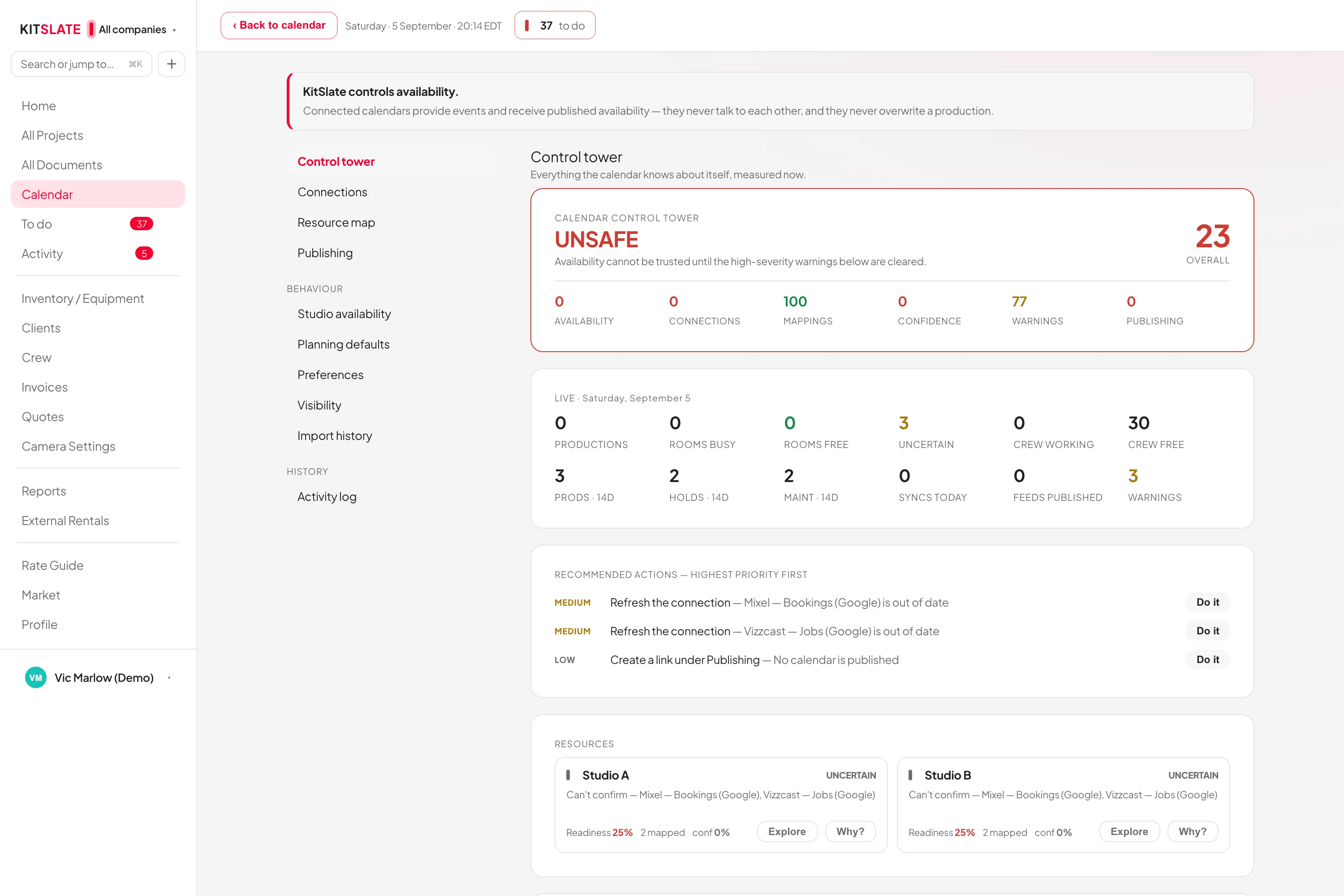
kitslate.app/app · calendar · control tower
The calendar control tower — connected calendars, their health and what each one blocks
Each connection, its health, and what it blocks.
01 · CALENDAR — one account per company

Google Calendar, both directions, kept apart.

Each company connects its own Google account, so a studio with two companies in two Gmail accounts keeps them separate. Every save writes into that company’s chosen calendar within seconds.

Out: seconds, not hoursA new booking, a moved date or a cancelled job reaches Google as it happens, rather than waiting for Google to come and look. A write that does not go through is tried again on the next sweep, every two minutes.
In: any calendar with an addressGoogle, Apple iCloud, Outlook / Microsoft 365, any iCal address, or a one-time .ics upload. Bookings from a website or a marketplace arrive the same way — connect the calendar they go to.
The same calendar can be on both sidesKitSlate stamps what it writes and skips that stamp on the way back in, so its own shoots never return as imported bookings.
KitSlate stays the recordProductions are edited in KitSlate and written out to Google. Outside bookings arrive as events that hold dates, and stay events.
02 · MONEY & MAIL — Stripe, and replies to you

Paid by card. Sent in your name.

Stripe handles card payments on invoices, and every document KitSlate emails goes out under your company’s name, with your company on the letterhead and replies coming back to you — not to KitSlate.

A real Pay buttonAn invoice carries a pay link and a QR code. The money settles to your own Stripe account; KitSlate never holds it.
Cardholder data never reaches KitSlateStripe processes it. KitSlate stores no card number, and the payment pages are Stripe’s own.
Replies come to youCall sheets, quotes, invoices and release requests all send with the company on the letterhead and your reply address on them.
ShareGridPaste an item’s ShareGrid listing on it and it shows on your public page at its rate. Rental payouts import as a CSV.
03 · ACCOUNTING — files in and out

QuickBooks, Wave and Xero: file exchange only.

KitSlate reads and writes their formats. Export from your accounting system and drop the file in; export a CSV here to take back. You move the file, which keeps the boundary between the two systems where you can see it.

You never say which system printed itDrop an invoice list, a line-item export or an invoice PDF; the importer looks at what you gave it and routes it to the reader that understands that shape.
Nothing goes in until you press ImportEvery import shows a review first — what each row is, whether it is new or an update, and which production it will attach to and why. Cancel and not a row is written.
Where the boundary sitsKitSlate produces a file and reads a file. Your ledger stays under your own hand, and every movement between the two systems is one you performed.
Everything in and out, listedSettings → Integrations → Data in & out is a table of every import and export in the app.
QUESTIONS — the ones people ask first

Before you try it.

How does KitSlate work with QuickBooks or Xero?

By file. Export an invoice list, a line-item export or an invoice PDF from them and import it here; export a CSV here to take back. Every movement is one you perform.

Can two companies use different Google accounts?

Yes. The connection belongs to the company, not to the workspace, so each connects its own account and disconnecting one leaves the others untouched.

Do my clients need an account to pay?

No. The invoice carries a pay link and a QR code that open Stripe’s own payment page.

Can I send from my own domain?

No. KitSlate sends the email from its own sending address under your company’s name, with your company on the letterhead and your address as the reply-to, so a reply comes back to you rather than to KitSlate.

Connect one and watch it move.

The sandbox shows the calendar, the documents and the money side without any account to connect.