Features · Reports

Twelve reports. The headline figures drill in.

Twelve reports across money, equipment and crew, built from the jobs, quotes, invoices and inventory already in the workspace. Nothing is entered for reporting, and the headline figures click through to the records they were calculated from.
kitslate.app/app · reports
The KitSlate reports hub — money, equipment and crew reports listed in three groups with the company filter above them
The company filter at the top applies to all of them.
01 · MONEY — booked, invoiced, received

Where the money actually came from.

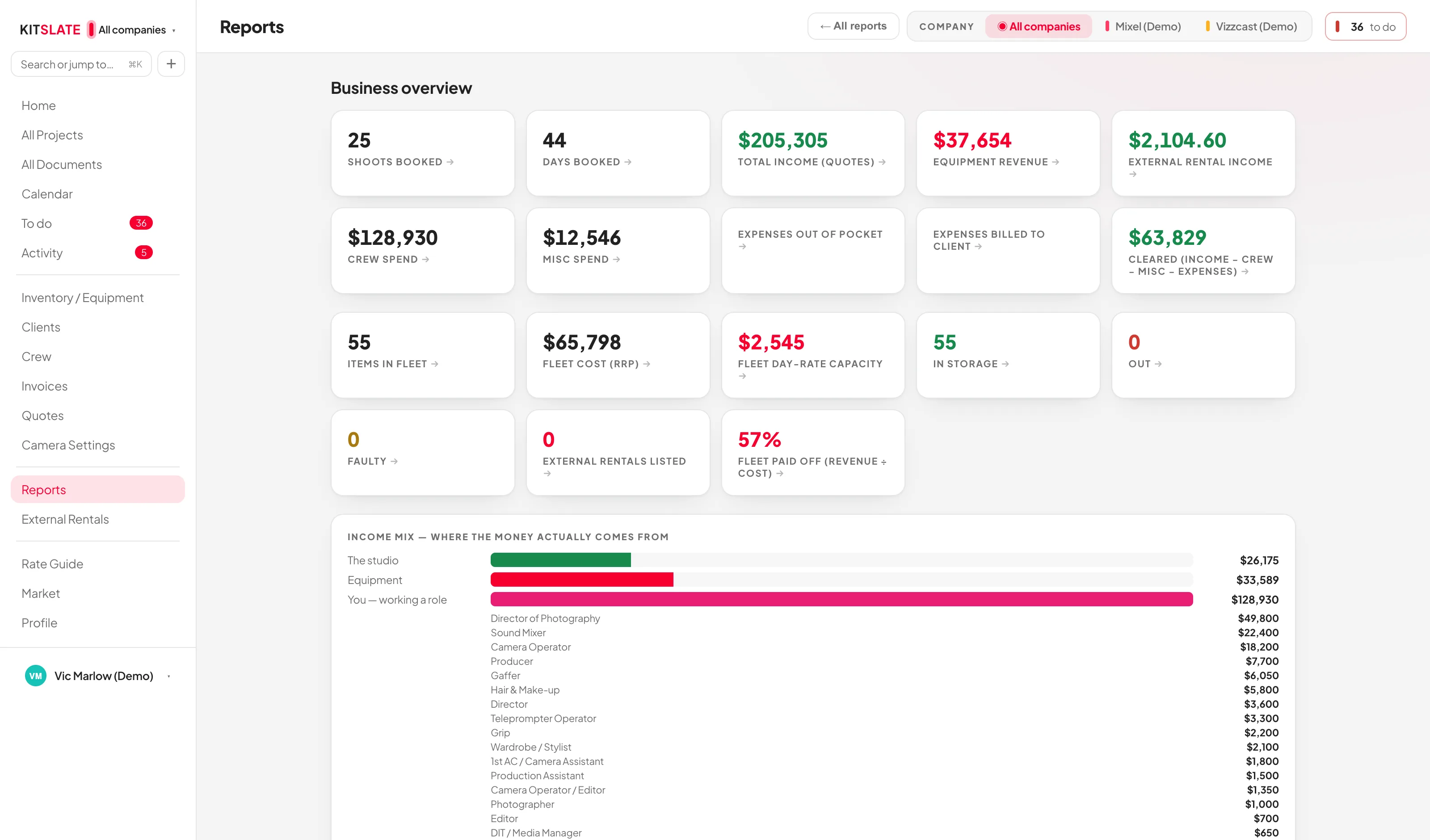
Business overview, income tracker, expense tracker, profit & loss by job, outstanding invoices and client revenue. INCOME MIX splits the money into studio, equipment, crew and other on three bases — quoted, invoiced and received — by section, client, job or month, with quoted crew broken out by role.

Cleared, not just billedIncome minus crew, minus misc, minus expenses. Expenses are split into out of pocket and billed to the client, so reimbursed spend is not counted as a cost.
Quoted, invoiced, receivedQuoted comes from each job’s quote, or day rates × days where there is none; invoiced and received come from your published invoices and what was paid.
Invoices raised elsewhere still countImport an invoice list or an invoice PDF, link each row to a job, and KitSlate checks it against that job’s quote: matches, or differs.
Outstanding, by ageWhat is owed, how overdue, and whose. Every row opens the invoice it came from.
02 · EQUIPMENT — has it paid for itself

Which gear earns, and which sits.

Earnings & payback, the gear status board, idle gear, and insurance & replacement values — read from the same inventory the gear lists are built from.
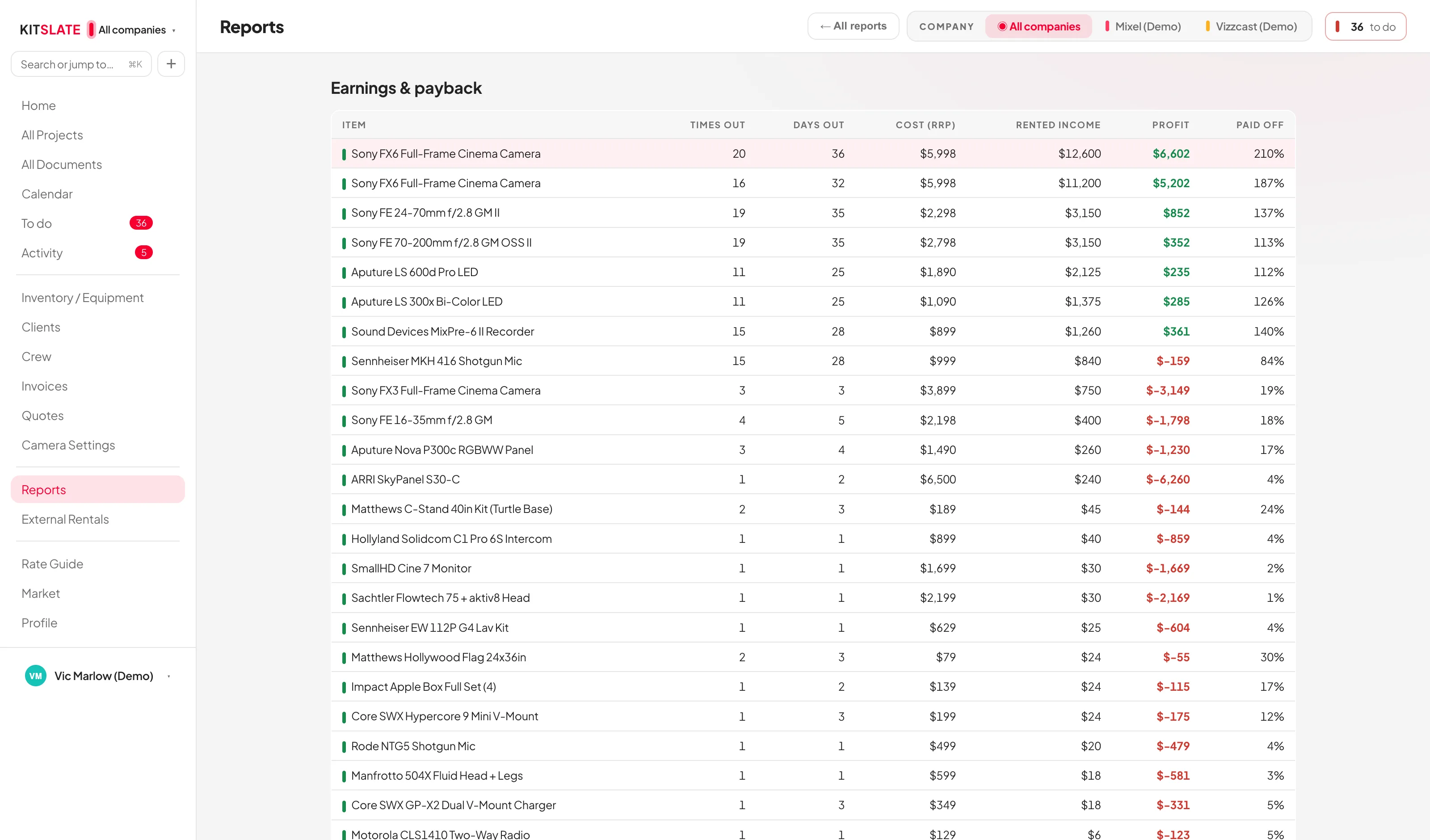
Payback per itemWhat a body or a lens has earned against what it cost, and the fleet figure: revenue divided by cost, as a percentage paid off.
Day-rate capacityThe sum of every in-studio day rate — what the fleet could bill on a day when everything went out.
Idle gearPriced items that have never been on a booking, with the day-rate capacity sitting idle and the purchase cost tied up.
Insurance and replacementReplacement value across the fleet, for the schedule your insurer asks for.
kitslate.app/app · reports · payback
The equipment earnings and payback report — each item with what it has earned against what it cost
Earned against cost, per item and across the fleet.
03 · CURRENCY — one band per currency

Each currency totals on its own.

Where your companies bill in different currencies, All companies shows one band per currency, each totalling its own and labelled with the currency it is in.

Figures stay in the currency they were earned inEvery total is reported in the currency it was billed in, so a figure means the same thing the day it was drawn and a year later.
Job money reads in the company that earned itIncome, equipment revenue, crew and misc spend, expenses and rental income all report in that company’s billing currency.
Equipment is reported separatelyFleet cost, replacement value and used-gear sales belong to the inventory rather than to one company, and are shown in the currency set under Settings → Accounting. Where that differs from a company’s billing currency, the page names both.
Figures click throughThe headline figures open the jobs, invoices, quotes or items behind them.
QUESTIONS — the ones people ask first

Before you try it.

Does KitSlate connect to QuickBooks or Xero?

No. It reads and writes their file formats: you export from them and drop the file in, and you export a CSV to take back. Nothing is fetched from them and nothing is sent to them.

What if I have not built quotes?

The quoted figure falls back to day rates × days, and invoiced and received come from your invoices. The reports still work; they get sharper the more of the job is priced.

Can I report on one company at a time?

Yes. The company filter at the top of the hub applies to every report, and picking one puts every figure in that company’s currency.

Can I get the numbers out?

Yes — the income and expense trackers export a CSV on Studio and up, and print as a PDF.

Try them on a full year.

The sandbox carries a year of jobs, quotes and invoices, so every report has something real in it.